8.2.5. Testing query with parameters
The query variables plug-in helps developers test their queries using variables that are replaced in the command at the moment of its execution. Basically, a query that contains some variables prefixed by $, like SELECT $cols FROM $schema.$table WHERE $condition has the values for each variable replaced and the parsed query executed. The variables and their values can be specified in a special widget that is toggled by the button Variables  in the SQL execution widget. The main goal of this feature is to accelerate the query testing, mainly if you write parametrized queries based on some ORMs' syntaxes. This plug-in supports four variable formats:
 $variable, :variable, @variable, and {variable}.
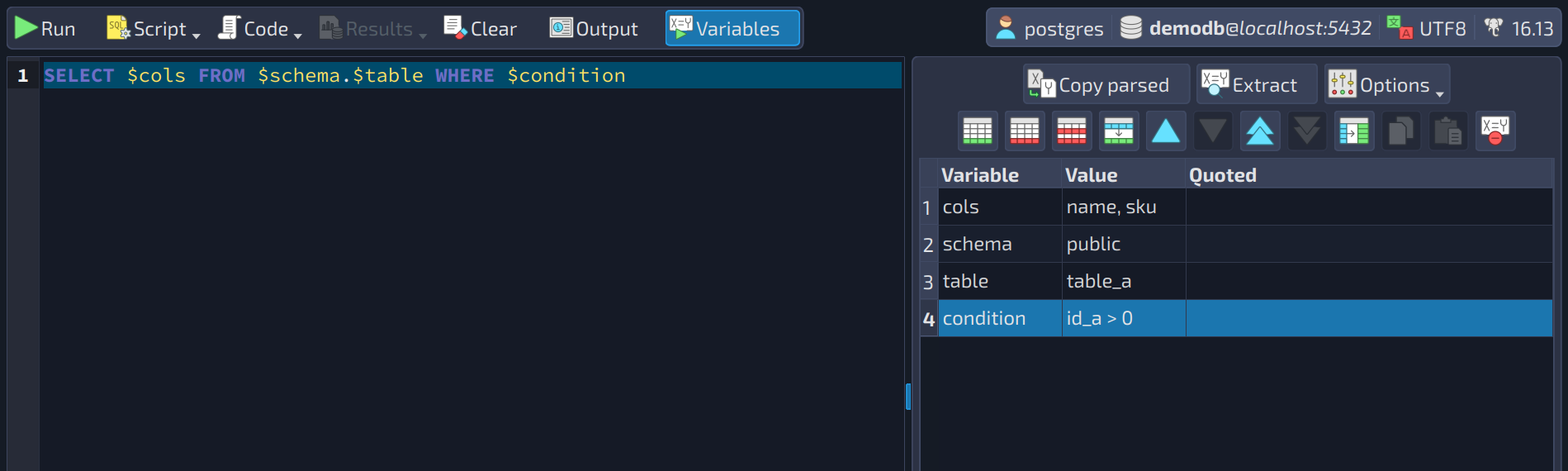
The button Copy parsed  copies to the clipboard the resulting query after parsing the original one, replacing the variables with their values. Now, the
 Extract button  performs a scan in the original query looking for variable patterns, and, once found, puts each result in the variables grid so the user can specify test values for them. The button
 Options  holds a dropdown menu containing two options. The first one,
 Empty values translate to NULL, causes empty-valued variables to be replaced by the keyword NULL. The second option, Escape quoted values with E'', forces the use of the special string quoting syntax that allows the use of C-Style constants within strings.
In the variables grid, we have the column Variable, which is the variable's name. Note that, although the variables in the original query are prefixed by a special character (e.g., $, @, :), there's no need to include that prefix in the variable name. During the query parsing, pgModeler will automatically prepend the accepted prefixes to the variable names and replace them accordingly. Also, duplicated variable names in the grid are accepted, but only the first value will be considered during the parsing. The column Value holds the variable's value that will be replaced in the original query. Beware that this field is completely free of any validation; the user is responsible for any character formatting and/or escaping. Data type values or even SQL keywords are accepted in this column. Finally, the column Quoted is a convenience feature that automatically encloses the value of the respective column in quotes (this is affected by the option Escape quoted values with E'').
The buttons over the grid add, remove, duplicate, and move variables, and copy the selected ones so they can be pasted in another query (even in another SQL execution tab). The last button  disables the use of variables: the query is then executed exactly as typed. Variable names accept only letters, digits, underscores, and hyphens: rows with empty or malformed names, as well as duplicated names, are highlighted and an alert explains the problem; malformed names are ignored when the query is parsed.