6.7. Model validation
The main goal of this tool is to avoid references or rules breaking during design time, as well as to prevent problems when exporting the model directly to a PostgreSQL server. This mechanism simplifies the way pgModeler loads and saves the model files, shortening the execution time of these two operations with the advantage that the validation creates a consistent, reliable, and error-free model.
The validation process is divided into seven steps, executed in this order: reference checking, name uniqueness checking, missing PostGIS extension, permanent relationship invalidation checking, unique keys similar to primary keys, foreign keys with SET NULL on not null columns, and object's SQL checking. The problems found by the first six steps are reported at two levels. Errors are problems that break the model or its export and must be solved, and some of them can be fixed automatically by pgModeler. Warnings are configurations that PostgreSQL accepts but that probably don't do what the user expects: they don't invalidate the model, they don't prevent the SQL checking, and they must be solved manually because the automatic fixes don't handle them. The steps unique keys similar to primary keys and foreign keys with SET NULL on not null columns generate warnings, while the other ones generate errors.
The first step, reference checking, analyzes if the objects are being created in the correct order. The basic rule when designing in pgModeler is that all objects must be created in a certain chronological order, but in many cases, the user cannot predict this situation and make links between objects without worrying about their creation order. This can generate a database model with several reference breaks, which means, objects being created before their dependencies.
In the second step, the name uniqueness checking, pgModeler verifies if tables, views, primary keys, unique keys, and exclude constraints have distinguished names if they reside on the same schema.
The third step, missing PostGIS extension, checks if one or more columns of tables or foreign tables use data types provided by the PostGIS extension (like geometry, geography, box2d, box3d, and raster) while the model has no extension named postgis. An error is raised for each column in this situation. To solve it, create the extension in the model or let pgModeler do it by applying the automatic fixes, which create the extension postgis in the schema public.
The fourth step, the permanent relationship invalidation checking, looks for the relationships that are permanently broken. A broken relationship in this context is the one that has the column propagation affected in some way, so one or more columns aren't created from the reference table to the receiver one (details about the column propagation mechanism can be found in section Relationships in Chapter 3). The only solution for permanent invalidation is the relocation of the relationship, which means changing the creation order of the object. This step runs only when the previous ones didn't report any error: the errors found there must be fixed first, and the relationships have to be revalidated after each fix.
The fifth step, unique keys similar to primary keys, checks the tables and foreign tables in which the primary key and a unique key constraint have the same columns. Although this is completely possible in PostgreSQL, pgModeler warns the user about the situation because, if the model is exported with it unresolved, PostgreSQL completely ignores the unique key having the same configuration as the primary key of its parent table, which can confuse the user.
The sixth step, foreign keys with SET NULL on not null columns, looks for foreign keys whose ON DELETE or ON UPDATE action is SET NULL while one of their referrer columns is declared as NOT NULL. As in the previous step, PostgreSQL accepts this configuration, but the action will fail when deleting or updating rows in the referenced table, so pgModeler raises one warning per foreign key, pointing to the first not null column found. To solve it, change the not null status of the column or the foreign key action.
The seventh and last step, the object's SQL checking, is useful to verify other details on the generated SQL, like stored procedures syntax, views definitions, and many other aspects not covered by the first six steps. Different from the other ones, this step is optional because it requires a connection to a PostgreSQL server, and it is not executed while the model has errors from the previous steps (in this case, a warning informing that the SQL checking was skipped is shown). Warnings don't prevent it from running.
Although it is possible to save an invalid model, doing so is risky and not recommended, since it can produce a corrupted model file that will demand fixes through the model fix tool or the command-line interface. To avoid problems, always validate your model before saving it. The validation widget on the image below encapsulates all the validation steps in a single object. The process is quite verbose, which facilitates the identification of errors. After executing the validation process, you can manually fix the problem based on the errors returned or let pgModeler apply automatic fixes for you.
NOTE: The validation isn't a perfect mechanism because it cannot detect any of the problems mentioned above in stored procedure sources, custom SQL code attached to other objects or even in default values of columns. In these cases, the user is responsible for fixing these problems manually by using the swap objects IDs tool (detailed in the next section), which can fix almost all these issues.
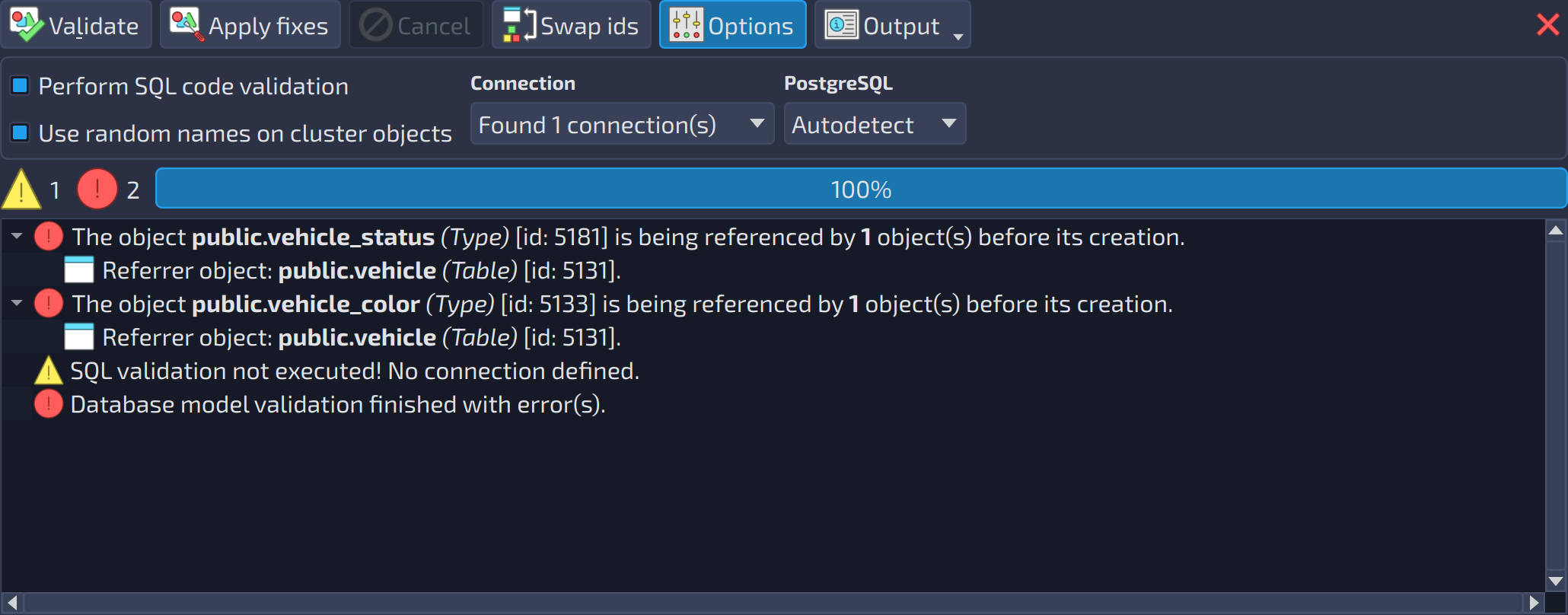 1234567891011
| Model validation | ||
|---|---|---|
| # | Field | Description |
| 1 | Validate | Starts a new validation process on the currently open model. |
| 2 | Apply fixes | Lets pgModeler apply automatic fixes to all the problematic objects listed in the output. After the fixes are applied, the validation process is triggered again when errors are still listed. |
| 3 | Cancel | Aborts a running validation process. Aborting the validation does not restore the initial state of the model, because the validation can happen in the middle of the automatic fix process. |
| 4 | Swap ids | Opens the dialog used to swap the IDs (creation order) of two objects. Generally, there is no need to use this dialog, except when you know that an object must be created before another; in that case, this tool helps to avoid errors. |
| 5 | Options | Shows or hides the SQL validation options. |
| 6 | Output | Output |
| 7 | Perform SQL code validation | Enables the validation of the SQL code in the DBMS. This process requires a pre-configured connection. The SQL validation occurs only in the last step (when all the objects have been validated) or when there are no warnings. |
| 8 | Use random names on cluster objects | pgModeler generates unique and temporary names for the database, role, and tablespace objects (cluster-level objects). This option avoids duplicated object errors when running the SQL validation. |
| 9 | Connection | The connection used in the SQL validation. |
| 10 | PostgreSQL | The PostgreSQL version used to generate the SQL code that is validated. |
| 11 | Validation output | Lists the information, warnings, and errors found by the validation. |
 : opens a menu with two actions that handle the output of the validation.