Relationships settings
The purpose of the Relationships section is to define global properties when creating relationships in the database model. The settings handled here vary from the mode in which relationship lines are drawn to the patterns used to generate the names of columns and constraints created by the relationships when connecting them to tables. Relationship settings are organized into four groups, Line style, Connection mode, Foreign key settings and Name patterns, and they are detailed right below.
Line style
The Line style combo defines how the relationship lines are drawn in the canvas. It replaces the Use curved lines for relationships check box that used to be in the General settings. The style is global: it applies to every relationship of every model and is not stored in the model files.
 1
| Line style | ||
|---|---|---|
| # | Field | Description |
| 1 | Line style | Defines how the relationships' lines are drawn. Straight lines connect the tables directly, curved ones replace the straight lines by curves and orthogonal lines use only horizontal and vertical segments with rounded corners (the points added manually to the lines are ignored in this style). |
The image below shows the same relationship in the three styles, from top to bottom: Straight, Curved and Orthogonal.
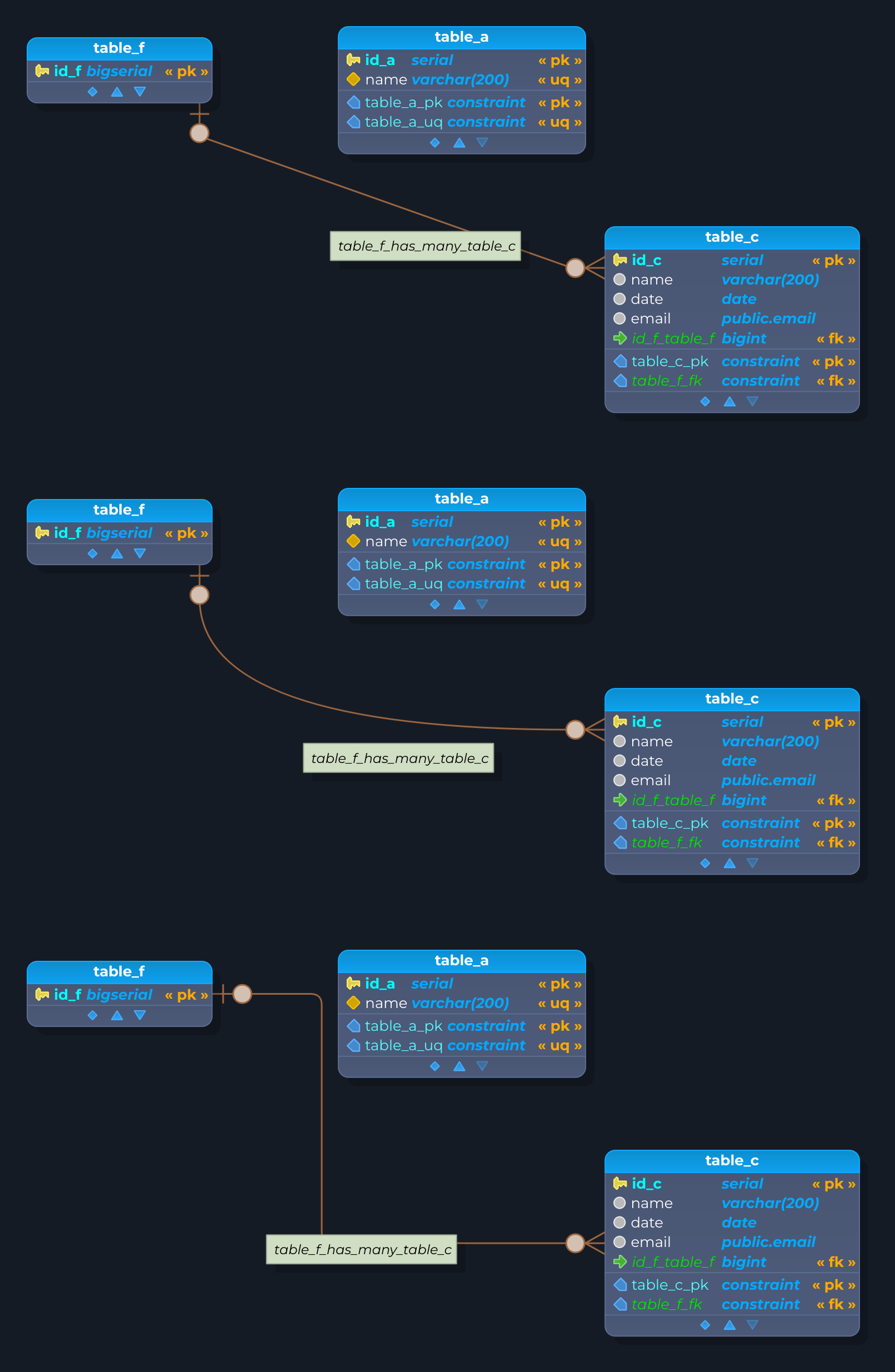
- Straight: the line connects the two tables directly, in a straight line. It is the cheapest style to draw, so it is the best choice for very large models.
- Curved: the straight line is replaced by a smooth curve. The points added manually to the line (
Shift + Click) and the Break line feature are available in this style, and both work better with the classical ER notation. - Orthogonal (the default): the line uses only horizontal and vertical segments, joined by rounded corners.
How the orthogonal lines behave
In the orthogonal style the lines are routed by pgModeler itself, so there is no need to arrange them by hand after the tables are moved:
- Routing around objects: the route goes around the tables that are in the way. When the layer rectangles are visible, the area they take around the tables is avoided as well.
- Crossings: where two lines cross, the one underneath hops over the other through a small arc (a bump). A darker apex means the line being crossed passes over the bump, a lighter apex means the bump passes over the line being crossed.
- Descriptors: the relationship descriptor (the lozenge, or the triangle of the inheritance, dependency and partition relationships) is kept on a straight stretch of the line, away from the corners. The crow's foot symbols at the ends of the lines are also kept on straight stretches, so the corners are never drawn over them.
- Connection mode: all connection modes are supported, including the crow's foot notation.
- Manual adjustments: the segments can be moved with
Shift + drag, and the displacements are saved in the model. The points added manually to the lines are ignored in this style. The details are in Handling relationship lines, points and labels.
Being the smartest of the three styles, orthogonal routing demands a bit more processing, and in scenes that are very dense in relationships it can be slower than the other styles. The recommendation is to use it in small to medium models, up to roughly 1,000 to 2,000 relationships. For models larger than that, the Curved and Straight styles are the better choice.
The new style is applied to the models when the settings are applied with the Apply button.
Connection mode
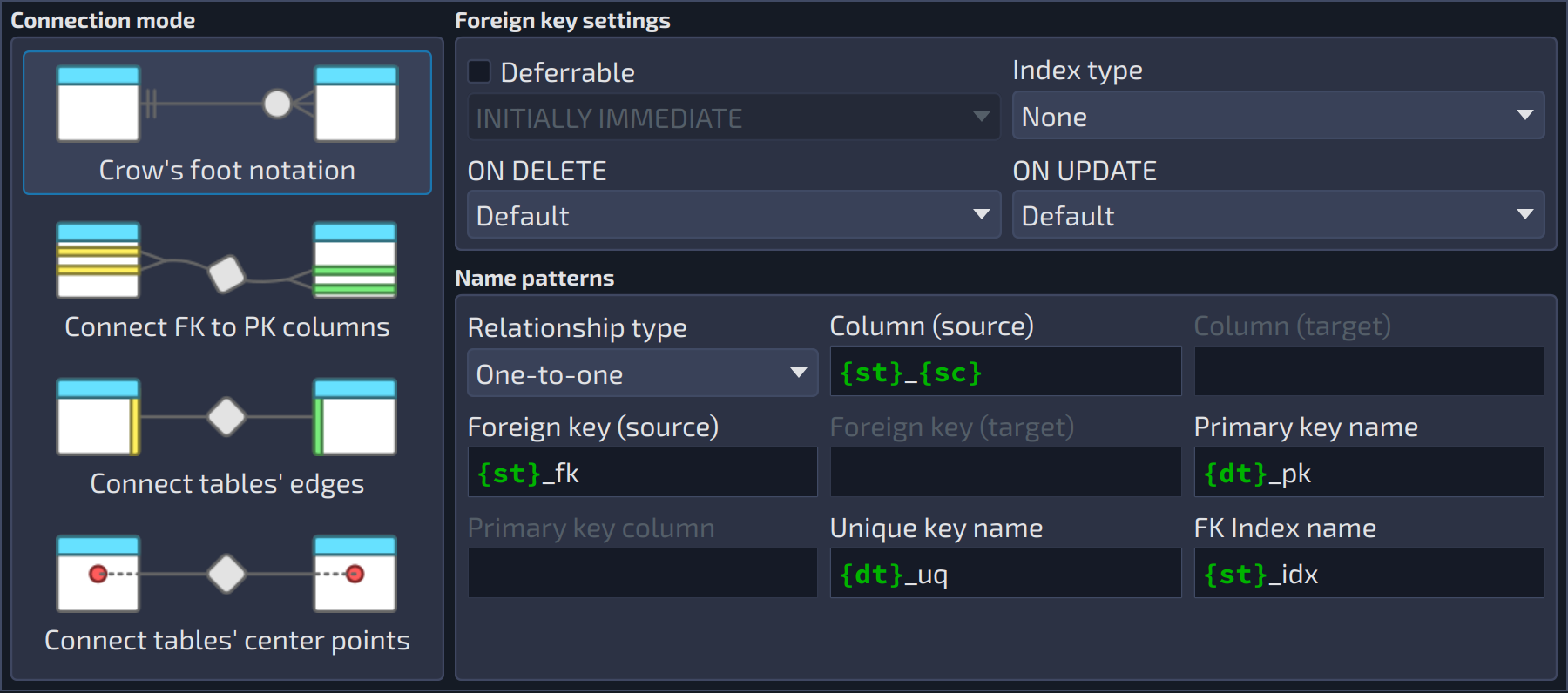
1234
| Connection mode | ||
|---|---|---|
| # | Field | Description |
| 1 | Crow's foot notation | This mode renders the relationships in crow's foot notation, which has better semantics and readability. It also determines the optimal point where the relationship is connected on the edges of the tables, taking their positions into account. |
| 2 | Connect FK to PK columns | This mode is available only for one-to-one, one-to-many, and fk relationships, but provides better semantics when linking tables by placing the lines on the exact point where the relationship occurs. It implies the usage of the classical ER notation. With this mode, the foreign key columns of the receiver table are directly connected to the primary key columns of the reference table, which helps to quickly identify the columns that represent the relationship. |
| 3 | Connect tables' edges | This mode determines the optimal point where the relationship is connected on the edges of the tables, taking their positions into account. It implies the usage of the classical ER notation. |
| 4 | Connect tables' center points | This mode is the classical one. It connects the relationship to tables through their central points. It implies the usage of the classical ER notation. This mode makes the columns that determine the relationship more difficult to identify visually, and its use is discouraged. This mode is the default for many-to-many, copy, and generalization relationships and can't be changed for them. |
FK settings & Patterns
This group of fields controls the settings for any foreign key generated by the relationships (deferral modes, update/delete modes). Also, in this group, the user can find the Index type (access mode) that is used to create an index on the relationship's generated foreign key columns. By default, all these attributes are used when creating new relationships, but they can be overridden by unchecking the Use global settings option in the relationship editing form.
This group of fields controls the name patterns for any object generated by relationships. These settings can also be overridden when creating new relationships by unchecking the Use global settings option in the relationship editing form.
1234567891011121314
| Foreign key settings | ||
|---|---|---|
| # | Field | Description |
| 1 | Deferrable | Makes the foreign keys generated by the relationships deferrable. These settings are used by the relationships that have the option |
| 2 | Deferrable | Deferral mode of the generated foreign keys: |
| 3 | Index type | Index access method used to create an index on the columns of the generated foreign keys. |
| 4 | ON DELETE | Action applied to the referencing rows when a referenced row is deleted ( |
| 5 | ON UPDATE | Action applied to the referencing rows when a referenced row is updated ( |
| Name patterns | ||
|---|---|---|
| # | Field | Description |
| 6 | Relationship type | Relationship type whose name patterns are being edited. Each type keeps its own set of patterns. |
| 7 | Column (source) | Pattern for columns generated based upon reference table's pk (1-1 and 1-n) or based upon source table's pk (n-n). |
| 8 | Column (target) | Pattern for columns generated based upon target table's pk (n-n). |
| 9 | Foreign key (source) | Pattern for foreign key generated based upon reference table's pk (1-1 and 1-n) or based upon source table's pk (n-n). |
| 10 | Foreign key (target) | Pattern for foreign key generated based upon target table's pk (n-n). |
| 11 | Primary key name | Pattern for primary key generated by identifier relationship. |
| 12 | Primary key column | Pattern for primary key generated by identifier relationship. |
| 13 | Unique key name | Pattern for unique key generated by the relationship. |
| 14 | FK Index name | Pattern for foreign key indexes generated by the relationship. |