4.5. Snippets settings
pgModeler supports code snippets, which are text fragments mainly used to avoid repetitive code typing when managing databases via the SQL tool on the Manage view. Snippets can be written in the form of pure SQL commands or using a special set of commands known as schema microlanguage (detailed in Appendix I: Schema microlanguage), a simple programming language used internally by pgModeler to generate code. To provide users a way to store their own code snippets, pgModeler implements a snippet configuration widget. The widget groups snippets by object type and also provides basic code validation when writing snippets in the schema microlanguage.
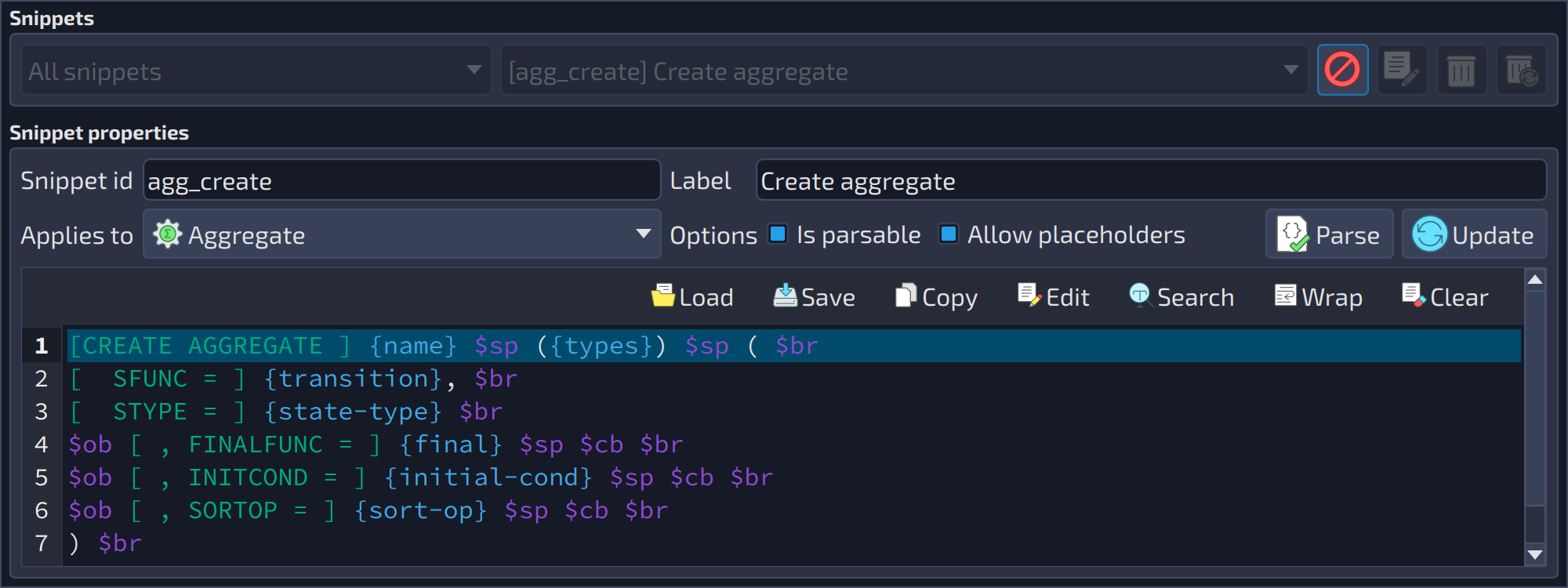 1234567891011121314
| Snippets | ||
|---|---|---|
| # | Field | Description |
| 1 | Filter | Filters the list of snippets by category ( |
| 2 | Snippets | Lists all the available snippets. The New |
| 3 | Cancel edition | Cancel |
| 4 | Edit snippet | Edit |
| 5 | Delete snippet | Delete |
| 6 | Delete all snippets | Delete all |
 button, which starts a new snippet, is not shown in the capture because it is hidden while a snippet is being edited. The other buttons beside the list are described below.
 : cancels the editing of the selected snippet.
 : loads the selected snippet in the fields below so it can be edited.
 : deletes the selected snippet.
 : deletes all the snippets.
| Snippet properties | ||
|---|---|---|
| # | Field | Description |
| 7 | Snippet id | The unique identifier of the snippet. It is listed in the code completion widget and is used to insert the code of the snippet in any source code field. |
| 8 | Label | A brief description of the snippet. |
| 9 | Applies to | The category or object type the snippet belongs to. |
| 10 | Is parsable | Indicates that the snippet is written in the schema micro language syntax and needs to be parsed. In a parsable snippet, the attributes enclosed by |
| 11 | Allow placeholders | When a parsable snippet is handled, the empty attributes are replaced by a value in the format |
| 12 | Parse | Parse |
| 13 | Add / Update | Add |
| 14 | Snippet code | The code of the snippet. Parsable snippets can use the attributes of the object enclosed by |
 : parses the snippet to check for syntax errors. It is enabled only for parsable snippets.
 / Update
  : adds the snippet configured in the form to the list or, while a snippet is being edited, replaces it with the one configured in the form (the button takes the place of
  , Save
  , Copy
  , Edit
  , Wrap
  , and Clear
  .
.